Gemini Enterprise: What Changes with Gemini 4 Neon and How to Use It
Gemini 4 Neon reads up to 1 million tokens and costs $3 per million input tokens. We explain what to buy, which processes to use it in by industry, and how to budget document analysis without locking yourself into a single model.

Google launched Gemini 4 Neon on November 18, and for a business, the news is more financial than technical: it reads up to 1 million tokens at once, offers four reasoning levels, and costs $3 per million input tokens and $15 per million output tokens, according to 9to5Google. Processing large volumes of contracts, case files, or shipping documents becomes cheaper, and evaluating Gemini Enterprise becomes a calculation you can run before you invest.
The model is already available in the Gemini API, in Gemini Enterprise, and in the app for Pro and Ultra plans, according to Google's official announcement; in the app, it replaces Gemini 3.1 Pro. TechTarget describes it as a model built for agents that work on long-running tasks with spreadsheets, PDFs, audio, and video, and notes that it is the sixth model Google has released since September.
If your company already pays for Google Workspace, the useful question isn't which model tops the leaderboards, but what to buy, which documents to feed it, and which process to use it in. We answer that here, along with a per-token budgeting method that will still work when the next model comes out.
What Gemini 4 Neon changes in business terms
An entire case file fits in a single query
A 1-million-token context lets you analyze a contract with all its exhibits, or a complete case file, without splitting it into chunks. That cuts preparation work and reduces the risk of the model losing connections between sections, such as a penalty in an exhibit that modifies a main clause.
Four reasoning levels: you pay for the effort you need
Extracting an expiration date is low-level work; comparing a contract against your risk policy demands more. Moving up a level usually means longer response times and more output tokens, so choose it per task, not out of habit.
Reading is cheap; writing costs five times more
At $3 for input and $15 for output per million tokens, cost depends mostly on what you ask it to return. A process that returns structured fields costs far less than one that writes long summaries of every document.
Gemini Enterprise, app, or API: what to buy
| Option | Typical use | How documents get in | Choose it if… |
|---|---|---|---|
| App (Pro or Ultra) | Individual tasks | You upload files manually | You want to explore |
| Gemini Enterprise | Teams' daily work | Model selector and API | Several departments will use it |
| Gemini API | Automated processes | Your system sends batches | There's volume or an ERP/CRM |
Rule of thumb: the app is for testing ideas; Gemini Enterprise is for your team to work with organization accounts; and the API is for when the process repeats hundreds or thousands of times and the output needs to feed another system. Before uploading customer information, confirm with your administrator which plan you have and which terms apply to the use of your data.
Which processes to use it in, by industry
- Professional services (contracts): extract parties, term, penalties, and automatic renewals; compare against your template and flag deviations so the attorney reviews only what's flagged.
- Logistics (shipping documents): cross-check commercial invoices, packing lists, and waybills to catch discrepancies in weight, quantity, or consignee before the shipment leaves.
- Healthcare (medical records): summarize history, medications, and allergies to prepare for an appointment or an insurance claim. The clinical decision always belongs to the physician, and health data is sensitive personal data with legal protection obligations.
- Fintech (identity verification): compare data from the ID, proof of address, and application to detect inconsistencies. The model doesn't replace validation against official sources or the compliance team's decision.
These workflows have something in common: lots of documents, little variation in what you're looking for, and a high cost of reviewing them by hand. That's why they tend to be good first candidates for AI process automation.
How to budget with Gemini API pricing
The base formula is: cost = (input tokens ÷ 1,000,000 × 3) + (output tokens ÷ 1,000,000 × 15), in US dollars.
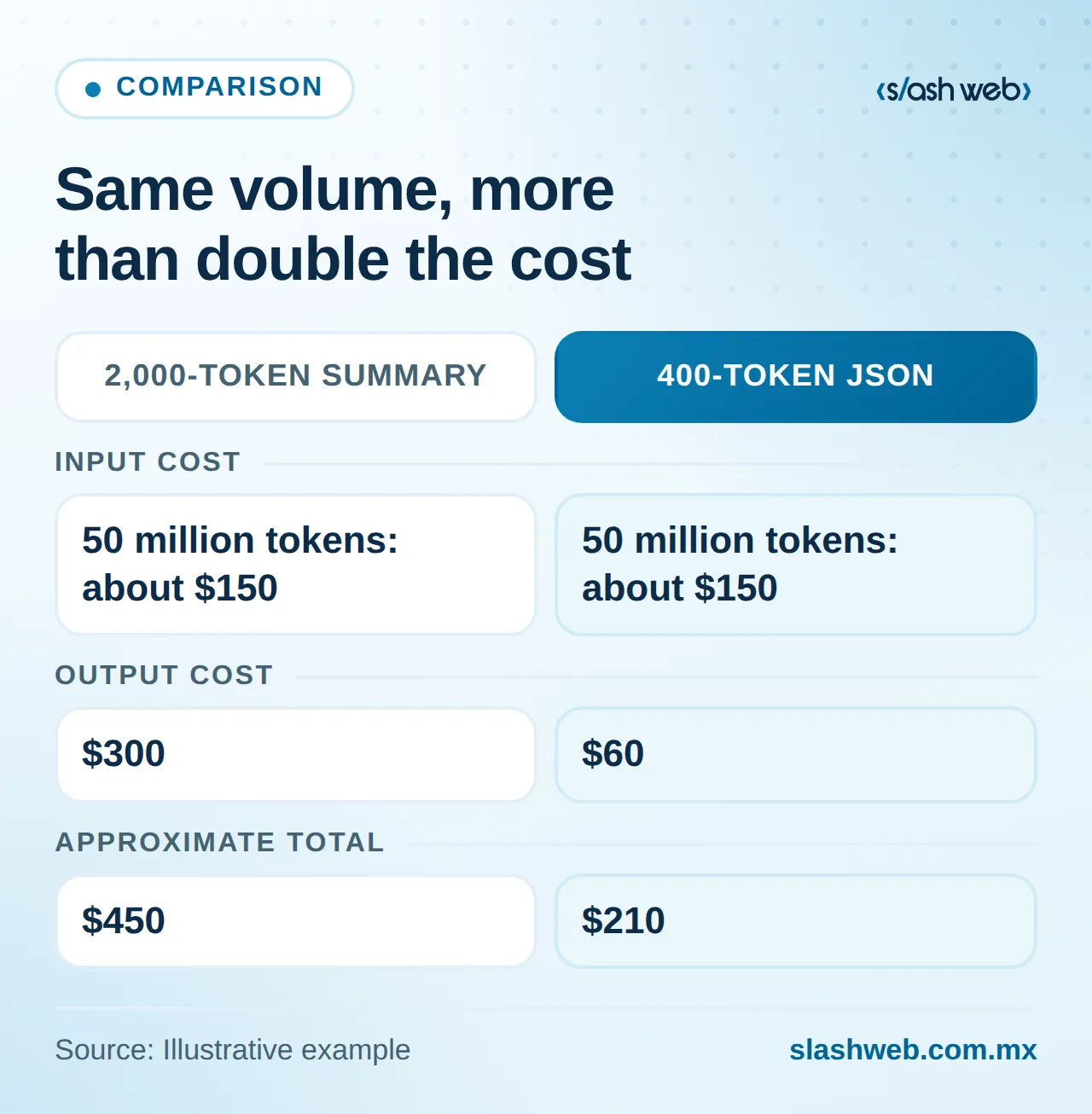
Illustrative example: a company processes 10,000 documents of 5,000 tokens each. That's 50 million input tokens, about $150. If it asks for a 400-token JSON with the key fields for each document, that adds 4 million output tokens: $60. Approximate total: $210. If it asks for 2,000-token summaries instead, output rises to $300 and the total to $450. Same volume, more than double the cost.
That calculation doesn't include development, storage, or human review, and higher reasoning levels add tokens. To get to a defensible number:
- Gather a sample of 20 to 50 real documents from the process and measure their tokens with the API's token counter; you'll get a reliable average per document.
- Define the exact output (fields, format, and maximum length) with whoever will use the result; this controls output cost and makes integration easier.
- Test the sample at the lowest reasoning level and move up only if accuracy falls short; record tokens and correct answers per level.
- Multiply the average by your monthly volume and add a margin for retries and longer documents; you'll have a realistic monthly budget.
- Compare that cost with the hours your team currently spends on data entry or review; if the savings aren't clear, adjust the scope before scaling.
How to connect your documents without locking into a single model
Google released three Gemini 4 models in two weeks. If your prompts, connectors, and rules depend on a model's name, every release turns into a project. The solution is to treat the model as a replaceable component:
- Your documents stay in your repository (Drive, your ERP, or your document management system), with the department-level permissions you already have.
- A middleware layer decides which model to use. Switching from Gemini 4 Neon to another model, from Google or another provider, should be a configuration change.
- A test set of documents and expected answers lets you evaluate a new model in hours, comparing accuracy and cost.
Long context is useful for large, individual cases, like a contract with exhibits. To ask questions across thousands of documents (policies, historical contracts, manuals), a RAG approach works better, since it sends the model only the relevant chunks. If you also want an assistant to act on that information, that's where AI agents connected to your systems come in, built on a well-designed AI integration.
Review your architecture with this checklist:
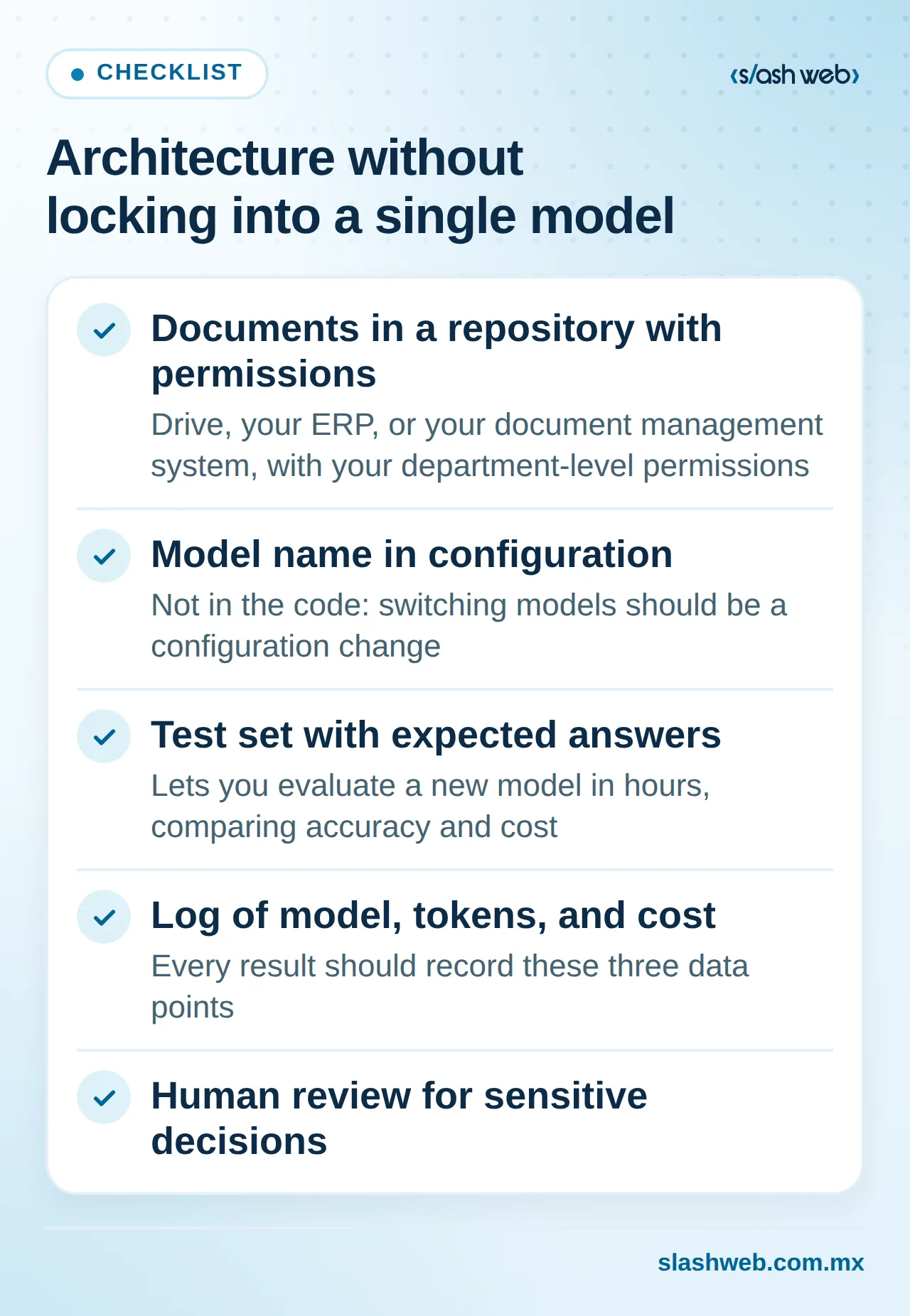
- Documents live in a repository with department-level permissions
- The model name is in configuration, not in the code
- There's a test set with expected answers
- Every result logs model, tokens, and cost
- Sensitive decisions go through human review
Common mistakes and how to avoid them
- Using personal accounts with customer data. Work only with organization accounts and review your plan's data terms.
- Stuffing everything into the context on every query. Sending 1 million tokens costs $3 each time; for frequent questions, use RAG.
- Choosing maximum reasoning for everything. Start low and move up only where accuracy requires it.
- Scaling without measuring. Without a test set, you won't know whether the model is getting it right or whether the next one is better.
What to do this week
- Ask your Google Workspace administrator which Gemini features your plan includes and which terms apply to your data.
- Pick a high-volume process (contracts, shipments, records, or identity verification) and gather 20 sample documents without sensitive data.
- Use the formula to calculate that process's monthly cost and compare it with the hours your team currently spends on it.
Conclusion
Gemini 4 Neon makes reading large volumes of documents cheaper and lets you budget each process with a simple formula. Gemini Enterprise pays off when you choose the right channel (app, enterprise plan, or API), ask for short outputs, and measure accuracy before scaling. Since the next model will arrive soon, the lasting value lies in how you connect your documents, not in the model of the moment.
At Slashweb, we help companies in Mexico and the United States take these processes from pilot to production, connected to their ERP, CRM, and repositories. If you want to estimate the cost of your use case with your own documents, contact us and we'll review your process.
Frequently asked questions
What is a token, and how do I know how many a document has?
A token is a piece of text the model processes; a single word can take one or several tokens. The count depends on the language, the format, and whether the file includes tables or images, so estimating it by page count is often inaccurate. A scanned PDF and one generated from a word processor can produce very different counts even if they have the same number of pages.
Do I need Google Workspace to use Gemini 4 Neon in my processes?
Not necessarily. The Gemini API can be integrated with your systems even if you use another email or productivity suite provider. Workspace makes day-to-day use easier inside Gmail, Drive, or Docs, but for automated processes at scale, what matters is integration with your ERP, CRM, or repository.
Can I use it with scanned documents or photos?
The model is designed to work with PDFs, spreadsheets, audio, and video, so it isn't limited to plain text. Even so, file quality matters: blurry scans, stamps over text, or skewed photos increase errors. Include those kinds of files in your tests to see how it performs with your real documents.
What other costs are there besides tokens?
You need to account for developing the integration with your systems, document storage and indexing, the review interface, and the time your team spends validating results. The amount depends on how many systems you connect and how many validation rules the process requires. That's why it's best to start with a focused pilot and expand when the results justify it.
Slashweb
Want to apply this in your company?
Book a free call with a specialist and get a tailored proposal.